

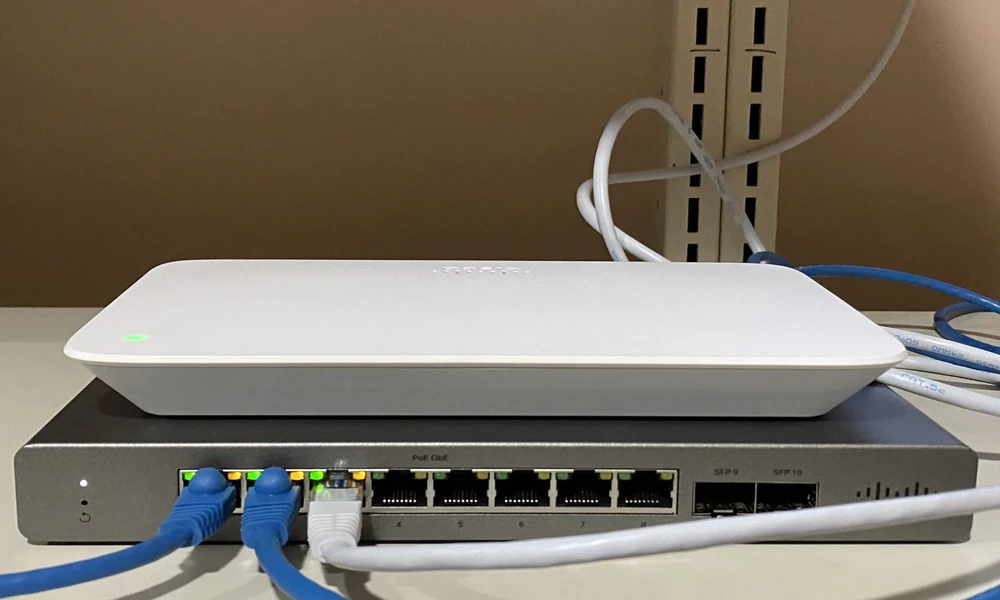
The Cisco Meraki MS130 family gives businesses several ways to build a cloud-managed access network, but the model numbers can make the choice look harder than it is.
The right MS130 switch usually comes down to four questions: How many devices need wired connections? Do those devices need Power over Ethernet? Do you need multigigabit ports? And how much room do you expect the network to need over the next few years?
At Link US Online, we recommend answering those questions before comparing individual SKUs.
Key Takeaways
- MS130 switches are Layer 2 cloud-managed switches designed for branch and campus access networks.
- Compact 8- and 12-port models suit smaller deployments, while 24- and 48-port models provide more room for larger networks.
- Models with “P” provide PoE capability for devices such as access points, phones, and cameras.
- MS130 “X” models add multigigabit Ethernet and 10 GbE SFP+ uplinks.
- Future wireless, camera, and IoT requirements should influence the switch you choose today.
What Is the Meraki MS130 Series?
The MS130 family is Cisco Meraki’s line of cloud-managed Layer 2 access switches for branch and campus environments.
Cisco offers compact and full-size configurations, with models ranging from eight wired access ports to 48. Depending on the model, businesses can also get PoE, 2.5 GbE multigigabit ports, and 10 GbE SFP+ uplinks.
Because the switches are managed through the Meraki platform, administrators can centrally configure ports, monitor network activity, schedule firmware updates, and troubleshoot supported deployments remotely.
When Does an 8-Port MS130 Make Sense?
An eight-port MS130 is usually a practical fit when the number of wired devices is limited.
Think about a small office, retail location, reception area, or branch that needs connections for a few workstations, access points, phones, or other network devices.
The standard MS130-8 provides eight 1 GbE access ports. Buyers who need power delivered through the switch can consider PoE versions, while the MS130-8X adds two 2.5 GbE ports and two 10 GbE SFP+ uplinks.
The 8X is especially worth considering when a small site has faster wireless infrastructure or needs higher-speed uplinks.
When Should You Move to a 24- or 48-Port Model?
Larger offices usually benefit from planning beyond the number of devices connected today.
If you currently have 18 wired devices, buying a 24-port switch leaves limited room for new access points, phones, cameras, printers, or workstations. A 48-port model may make more sense if expansion is already expected.
Cisco offers both 24- and 48-port MS130 configurations. Standard models focus on 1 GbE access, while selected X models add multigigabit connections.
The MS130-24X, for example, provides 18 1 GbE ports, six 2.5 GbE ports, and four 10 GbE SFP+ uplinks. The MS130-48X increases that to 40 1 GbE ports and eight 2.5 GbE ports, along with four 10 GbE SFP+ uplinks.
Do You Need PoE?
Choose PoE based on what will actually connect to the switch.
Power over Ethernet allows a network cable to carry both network traffic and electrical power. That can simplify installations for wireless access points, VoIP phones, IP cameras, and other compatible equipment.
The difference is important because PoE requirements are not only about whether the switch supports power. You also need enough total power budget for all connected devices.
For example, Cisco lists a 370-watt PoE budget for the MS130-24P and MS130-24X, while the MS130-48P and 48X provide up to 740 watts.
When Are Multigigabit Ports Worth Paying For?
Multigigabit ports become more important when connected devices can exceed standard gigabit Ethernet speeds.
Newer wireless access points are a common reason. A high-performance AP may serve enough wireless traffic that a 1 GbE wired connection becomes a bottleneck.
In that situation, MS130 X models provide 2.5 GbE access ports while retaining standard gigabit ports for devices that do not need the extra bandwidth.
You do not necessarily need multigigabit connectivity on every port.
That is why the mixed-port design can be practical.
Choose the Switch Around the Network
The best MS130 is not automatically the model with the most ports or highest specifications.
A small branch may be well served by an MS130-8P. A growing office may need an MS130-24P. A deployment supporting newer wireless equipment may benefit more from an MS130-24X or 48X.
At Link US Online, we carry and source Meraki networking hardware for businesses building, replacing, or expanding their infrastructure. Before ordering, map your wired devices, PoE requirements, uplink speeds, expected growth, and licensing needs. That makes it much easier to buy a switch that fits the network instead of paying for capacity you will never use-or replacing an undersized switch too soon.
This post was written by a professional at Link-Us Online. At Link-Us Online, we understand the power of networking and its potential to improve the efficiency of your business. Our team empowers users to discover and acquire high-quality networking hardware from a diverse range of suppliers. We offer a range of industry-leading solutions from top brands such as Cisco, Meraki, HPE, Juniper, APC, Fortinet, and Ubiquiti. Whether you’re a small business owner seeking reliable equipment for your expanding network or someone in the purchasing department working for universities, real estate management companies, or local governments hunting for specific gear, Link-Us Online is your dedicated ally. Contact us if you are looking to buy network equipment.